

Purpose
In this article, we will cover how to create an SDA case. An SDA case will trigger an investigation into booking issues/failures. An SDA case precedes a CSI case if you are specifically trying to remedy a booking failure. A CSI then follows the SDA, which is the case that is created to request a refund following the SDA case resolution.
Heading 1
In order to create an SDA case, you will need access to Salesforce.
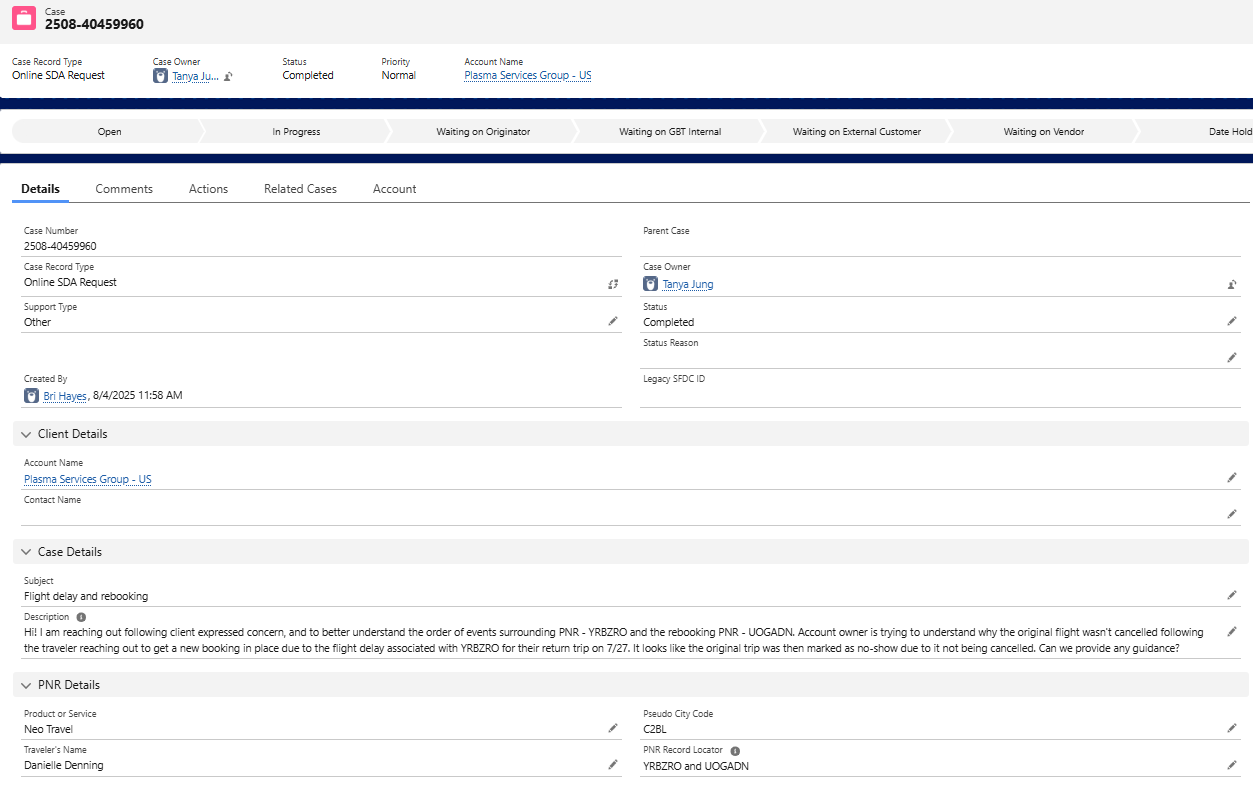
Step 1: Create a new case and select the case type -- Online SDA Request
Step 2: Select support type - Other
Step 3: Add appropriate client and case details. If there are specific amounts that may need to be refunded, go ahead and include that information as well. Be as detailed as possible.
Step 4: Under PNR details, be sure to include the appropriate traveler and PNR information. If there are multiple PNR's, please include under case details. The Pseudo City Code (PCC) should be listed as C2BL.
Example case - https://amexgbt.lightning.force.com/lightning/r/Case/500UN00000XKNVQYA5/view
 Tip: After submitting, please monitor your inbox for comments from the team handling your case. Once resolved, they may create a CSI on your behalf.